 Open WebIDE
Using Open WebIDE
Open a project, select a session and work between Files, Editor and Chat. Project tabs let you switch repositories; sessions keep separate conversations.
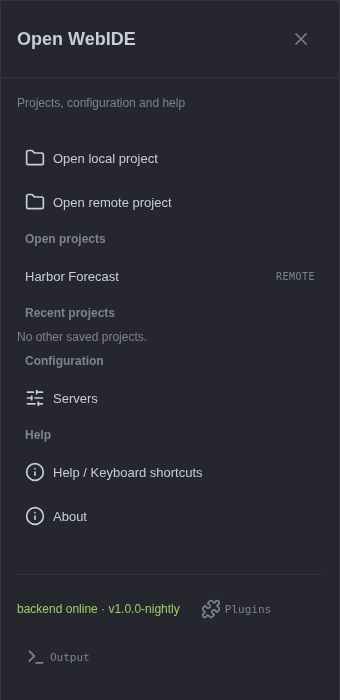
The logo and chevron open the app menu: local/remote folders, open and recent projects, Servers, Help / Keyboard shortcuts and About. On phones the same menu opens a side drawer. The user dropdown contains Settings, System prompts and Log out. Sessions contains conversations, project memories, skills and scheduled tasks.
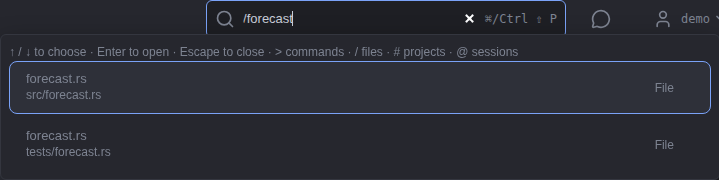
Use Search… or Ctrl/Cmd+Shift+P to find commands, filenames, projects and
sessions. Prefix a query with > for commands, / for files, # for projects or
@ for sessions. Arrow keys choose a result; Enter opens it and Escape closes
search. Commands remain available while filenames load. Grant access in Files
when a local project's folder is unavailable in this browser.
Editor tabs and actions share one row. Edit / Diff / Preview changes the view; Preview appears for supported files. Diff compares against the last commit, with Inline/Split display options. Save and Find remain beside the view selector. The … menu includes Copy path, Reveal in Files, Convert indentation and Discard changes…. Discard retains confirmation and pending-review guards.
The app footer combines cursor position, indentation, connection, Git and Output. On phones these controls live in the app menu drawer, leaving more room for the active panel. Project-less chat exposes Host environment through the Host statusline flyout; inventory and operations refresh only while it is open. Click Spaces: 4 or Tabs: 4 for separate indentation/tab widths and the configuration source. Layout and tree preferences sync through your account.
- First session: connect a model and review agent changes.
- Local and remote projects: file access and execution capabilities.
- Agent skills: reusable workflows, agent tools and skill import/export.
- Scheduled tasks: repeating or one-time prompts and execution hosts.
- Assistance model: automatic names, recaps, suggestions, Git drafts and search.
- Chat commands and goals: command discovery, activity, manual compaction and saved objectives.
- Editor: editing, navigation, diffs and previews.
- Files and context menus: actions on files and folders.
- About and open-source software: build details and bundled notices, including access from the offline PWA screen.
- Reload and reconnect: what survives a page reload and how to recover an interrupted connection.
Installing as a Progressive Web App (PWA)
Open WebIDE is a Progressive Web App (PWA). You can install it from Chrome, Edge, Brave or mobile browsers to run it in a dedicated window with standalone shortcuts and offline UI capabilities.
Requirements and browser configuration
- HTTPS or localhost: Browsers require a secure context (
https://orhttp://localhost:<port>) with a trusted certificate to offer PWA installation. See HTTPS with Tailscale for private HTTPS setup across devices without public exposure. - Flatpak browsers on Linux (Fedora Silverblue, Bazzite, SteamOS):
When installing a PWA from a sandboxed browser (such as Google Chrome, Chromium, Brave, or Edge installed via Flatpak), the browser attempts to create a desktop launcher entry in
~/.local/share/applicationsand icon assets in~/.local/share/icons. By default, Flatpak restricts access to these directories, resulting in an error:text This Flatpak does not have write access to ~/.local/share/applications and ~/.local/share/icons, so it cannot install or uninstall PWAs.To grant the necessary permissions, run:sh flatpak override --user --filesystem=~/.local/share/applications:create --filesystem=~/.local/share/icons:create <application-id>For example, for Google Chrome:sh flatpak override --user --filesystem=~/.local/share/applications:create --filesystem=~/.local/share/icons:create com.google.ChromeAlternatively, toggle Filesystem → Other files in Flatseal to add~/.local/share/applicationsand~/.local/share/icons. Restart the browser afterward to apply the filesystem override before installing or recreating shortcuts fromchrome://apps.
The roadmap tracks planned UI changes and capabilities. These guides describe the current app; controls may move as the layout evolves.
See MCP tools to configure host processes that extend the agent’s tools in remote projects and through paired local execution hosts.