 Open WebIDE
Git pane
Open Files → Changes for working-tree changes and the top-level History side menu for commits. History is a resizable panel and remains mounted when collapsed; its visibility, position and width are saved with your account. The same controls work for every opened project.
Working changes
Use a file's context menu to stage, unstage or revert it. Reverting asks for confirmation before discarding tracked changes. Enter a commit message and choose Commit staged changes to commit exactly the index. The Staged and Unstaged sections can be collapsed; use each file’s plus/minus icon or Stage all / Unstage all to move changes between them. A file with both indexed and working edits appears in both sections. Save editor changes before staging. A nested project will refuse a commit if the index also contains changes outside that project; open the repository root or unstage those files first.
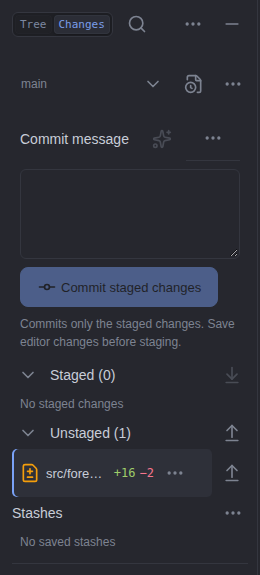
When a model is configured, an empty commit message is filled automatically after staging settles, using only the indexed diff. Your edits are preserved. The sparkles icon requests another summary. No commit is made automatically.
Stashes have Save, Apply and Drop actions in their menus. Save includes untracked
files; Apply restores the index and keeps the stash. Drop asks for confirmation.
Open the repository root to manage stashes; nested project folders can list them.
The existing draft-description actions and /commit command remain available.
Runtime proof files, retained recovery objects, unpublished creations and .spin
are excluded from status, diffs, staging and new stashes. Their case aliases are
reserved as well. Ordinary names such as
.openwebide/recovery-notes remain project files. A commit refuses runtime entries
already in the index; remove those entries from the index while preserving their
files before committing. A path-limited commit or new stash also waits for any
staged removal of legacy runtime entries to be committed.
Revert, stash, branch switching and pull refuse file/directory collisions that could replace hidden contents. Existing stashes and target revisions that would apply runtime entries require cleanup outside the app before application. Submodules are not recursively updated by branch switching or pull.
The branch picker switches branches or creates a new branch. Checkout preserves
uncommitted work; Git reports a conflict if switching would overwrite it.
The hamburger menu contains Fetch, Pull and Push, which show progress and their output or error. Pull uses
rebase after fetching and checking the target tree and local replay history.
Save or stash working changes first; pull does not create an automatic stash.
Push establishes tracking when needed. Operations use the branch's
configured upstream, falling back to origin and the current branch.
See Git SSH setup for execution-host authentication.
History
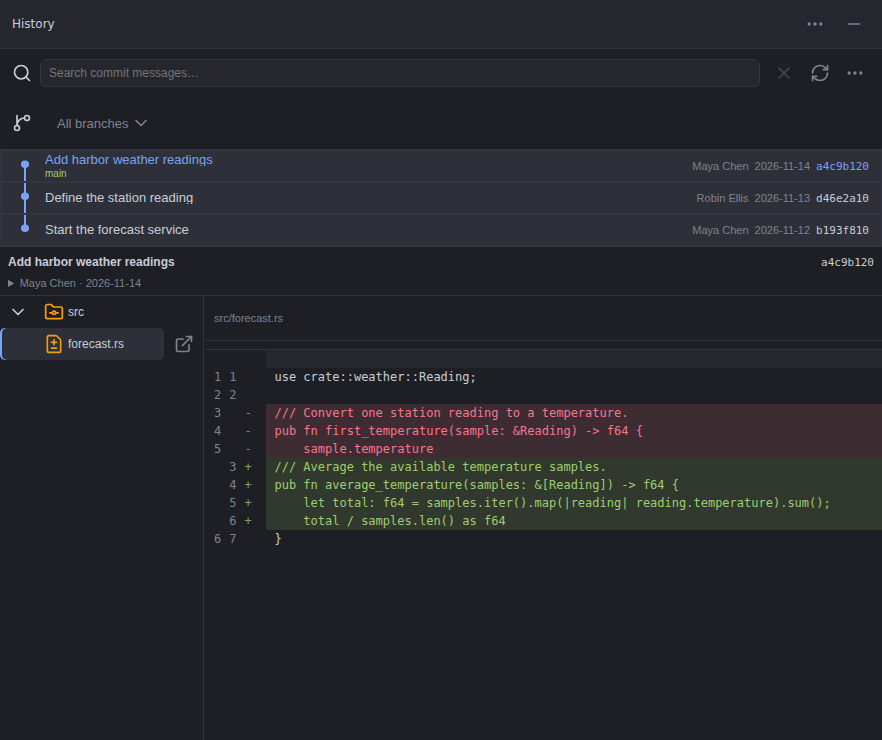
- Search commit messages automatically after a 300 ms pause in typing, or filter by a local branch, remote branch or tag.
- Inspect colored branch/merge tracks, reference labels, subjects, authors, dates and short hashes. Load older commits at the bottom.
- Select a commit for its full message, hash, author and committer details, references and a changed-file tree. Merge commits let you compare each parent.
- Select a changed file for its read-only, syntax-highlighted diff with original line numbers. The file tree stays visible. Open current file in editor opens its current version. Repository History stays inline; resize the panel for more space.
- Use View file history in a file’s action menu to open a file-specific modal with a branch dropdown, dated revision timeline and the same read-only inspector. Renames are followed within the opened project; choose a timeline point or commit to inspect that revision.
- The history hamburger menu contains branch actions. Checkout branch switches the selected branch. A remote branch creates a local tracking branch; New branch opens the usual branch-name prompt.
Tracks follow the parents recorded by Git. Squash merges appear as a single commit; rebased commits follow their rewritten ancestry. Retained pre-rebase refs appear as separate tracks. Octopus and nested merges preserve every parent.
History loads 100 commits at a time, up to 2,000 for a query. Narrow the search or reference filter to explore another part of a large repository. File history searches the newest 2,000 revisions of that file. Diff previews stop at 5,000 lines or 512 KiB and say when they are limited; choosing a file usually gives a smaller preview. Binary changes are identified by Git's diff output. Project, account and execution-host changes invalidate pending results.