 Open WebIDE
Monitors
Ask the agent to check an asynchronous process later—for example, “check whether
this build finished in ten minutes.” The monitor tool saves an ephemeral check
in the database and returns immediately. The bridge runs it in the originating
conversation; no browser tab or phone app needs to stay open. These checks do not
appear in Sessions → Tasks, which is for saved schedules.
The tool accepts these actions:
{"action":"start","prompt":"Check the build's current state and report the result.","delay_seconds":600}
{"action":"list"}
{"action":"cancel","id":7,"revision":1}
For repeated checks, supply interval_seconds (default 600) and max_checks
(default 1). Delays must be 5–86399 seconds and intervals 5–86400 seconds;
1–24 checks must fit before the 24-hour expiry. Each monitor expires 24 hours after creation. There can be at
most 20 monitors in a conversation. Repeats are scheduled after a successful
check completes, without overlapping responses. The check should cancel its
monitor when the requested condition is met. A monitor check cannot create
another monitor to extend its deadline.
Each check uses the session's current model, conversation, tools and approval rules. Pending approvals wait for the user; closing the app does not approve anything. Keep Spin, the model server and the execution bridge running.
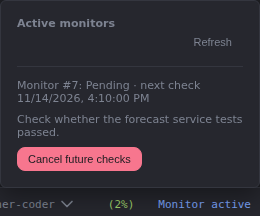
Click the monitor indicator in the conversation status line to open a compact flyout with pending/running/blocked status, the next check, host availability and the last result, or refresh and cancel future checks. The indicator appears only while a monitor is active. Stop stops an already-running response. Completed, cancelled and expired monitors are cleaned up; conversation messages remain. Failures, expiry and interruption leave a note in chat and stop repeats.
Remote and projectless checks run on the server bridge. Local projects need a paired native host with access to the selected folder. Use Authorize this folder's host in Monitors to verify and save the mapping, or reuse a mapping already authorized for scheduled tasks. The agent cannot authorize a host. Unavailable hosts wait until they reconnect or the monitor expires; browser folder permission alone does not authorize native filesystem access.
An undelivered claim can be recovered after its lease expires. Prompt injection and queue consumption are atomic. Once injected, a check is never automatically replayed after a host crash: it is marked interrupted instead, because rerunning it could duplicate side effects. Subagents remain tied to their parent run; monitors provide the separate mechanism for delayed follow-up work.