 Open WebIDE
Plugins and marketplaces
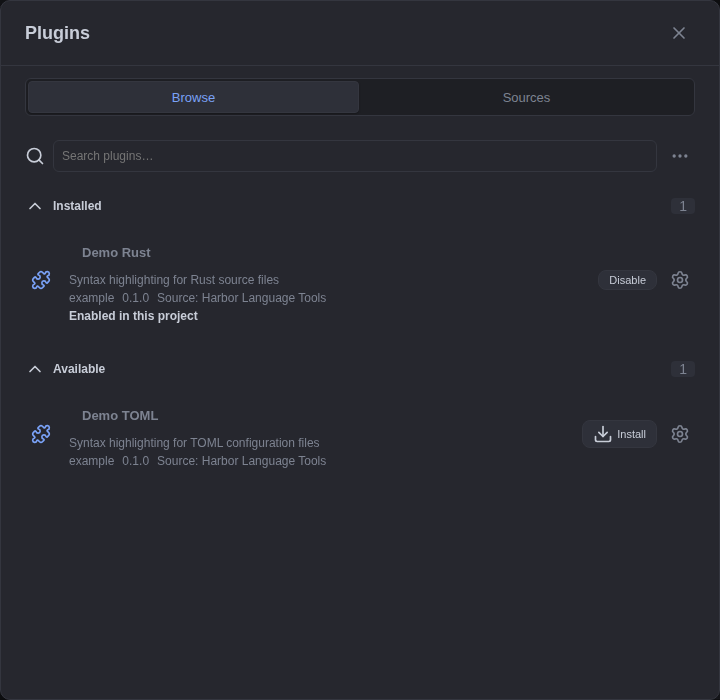
The Plugins button beside Output in the status bar opens discovery and plugin management. Browse the official marketplace and any custom public Git marketplaces configured for your account.
- Available shows plugins you can install. Click a plugin name to inspect its details. Its Source label identifies the marketplace. The official source is Open WebIDE.
- Installed shows status and project enablement. Use the gear menu to choose a release. Uninstalling returns a plugin to Available.
Search filters both lists. Rows show the publisher, version and available actions. Plugins install on the open project's execution host, or on the server host when no project is open. Plugins currently contribute agent skills, host-executed Rust tools, language support and declarative workspace panels through the public SDK. Older platform tool-group installations require an update to executable handlers.
Bundled and installed plugins
Execution hosts bundle a commit-pinned subset of the official marketplace: Web, Project Memory, Scheduling and Skill Authoring, plus 19 independent language-family packages covering 24 language IDs. Loading plugins installs missing defaults once through the normal validated host installation flow, with Notify updates. Existing accounts receive this baseline too. PR Review stays optional. The database remembers installation/removal by plugin identity; later sign-ins, refreshes and app upgrades do not reinstall removed defaults, reset project opt-outs or replace a selected version. Host unavailability defers initialization; sign-in and existing installations remain available, and refresh retries it.
See bundling default plugins for how release builds prepare these packages.
Installation enables a plugin across your existing projects by default. New projects inherit installed plugins too. Disable for project saves an opt-out; updates preserve it. Enable for project removes that opt-out by loading the installed version. Verified instructions/resources are stored as managed project skills, with visible provenance. Personal skills remain independent; a contributed skill name collision aborts the installation transaction without overwriting data. The project's global Skills switch still applies.
Marketplace sources and updates
Add a marketplace source
Open Plugins from the status bar and select Sources. The Manage marketplace sources action in the Plugins menu opens the same tab. Select Browse to return to your installed and available plugins.
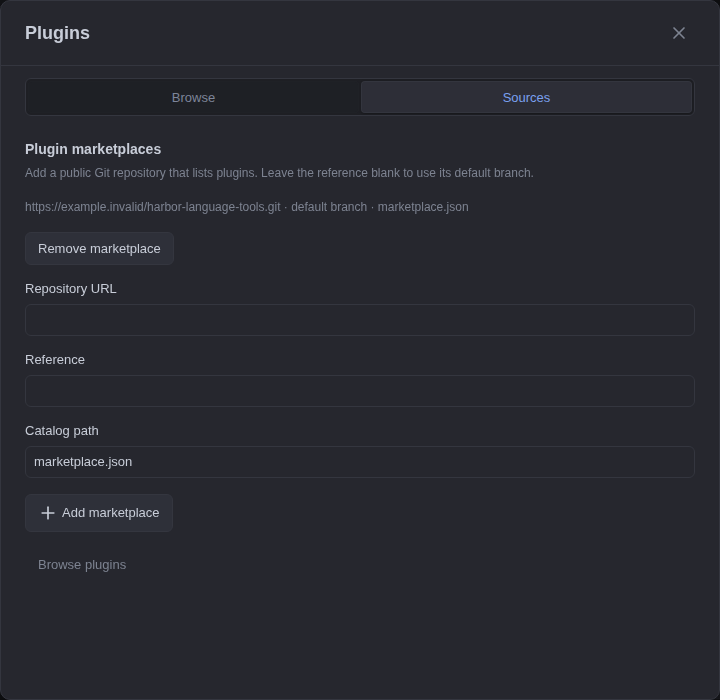
The official source is https://github.com/openwebide/plugins.git, using its
default branch and root marketplace.json. It is built in and cannot be removed.
Additional sources accept a public Git repository URL, optional branch/tag/commit
reference, and catalog file path. Releases declare their immutable commit and
package directory and inherit the marketplace's repository.
Removing a custom source stops discovery without uninstalling its packages. Sources and caches are user-scoped database settings.
Choose an update policy
The Plugins status-bar button shows a count when updates are available. The Installed heading shows Update all (N) when updates are available, even when the section is collapsed; each installed plugin's gear menu offers an individual update, release selection and update preferences.
- Notify is the default. New releases appear in the update count and the installed version stays pinned until you update it.
- Automatic applies compatible updates while the app is open, with the existing capability review. Major version changes and minor changes before 1.0 require a manual update.
- Off hides update notifications and prevents automatic updates.
Refresh catalogs
Server and paired bridge hosts check catalogs every 15 minutes even while all browser clients are closed. Checks start when an account has an installation with Notify or Automatic enabled; accounts with only Off installations are skipped. Paired hosts check accounts with installations prepared on that host; the server host can check any account with eligible installations. Checks share an account-scoped database lease, so connected hosts do not duplicate work. Catalog results, check times, failures and retry times survive restarts. Source edits revoke pending checks so stale results cannot restore removed sources.
Each Git source request has a 30-second deadline. Failed checks report the source, retain cached releases and retry after one minute, doubling up to 15 minutes. Expired leases allow another live host to recover a check after a crash.
The browser reads persisted results at sign-in and every minute while idle. You can refresh manually from Plugins. Refreshing updates discovery and the update count. Installation and enablement use the update controls.
These discovery checks work without project folder mapping on a paired host. Host workers use the daemon's configured backend API URL and shared secret, as documented in execution bridge setup. The server host can continue checking account catalogs when a paired host is offline.
Switch releases or uninstall
Selecting another release updates or rolls back the installation and enabled projects together. Failed updates preserve the installed release. Project opt-outs remain disabled. Uninstall removes the installation, inherited defaults and managed skills from all your projects, without deleting personal memories, skills or schedules. Host snapshots and active run instructions/resources remain pinned; changes apply to subsequent runs.
Install a pinned plugin
For packages outside a catalog, choose Install a pinned plugin manually from
the Plugins hamburger menu and
enter a public Git repository URL (HTTP, HTTPS, SSH or Git protocol), a full
lowercase commit ID, and the directory containing plugin.json; use . for the
repository root. The reference PR Review 0.1.0 package uses:
- Repository:
https://github.com/openwebide/plugins.git - Commit:
e79185c2b25f713503b70e23ee7e91e66c5af208 - Package directory:
plugins/pr-review
Local projects need their paired native bridge and folder access. Remote projects use the server bridge, including when opened from a phone. The browser does not clone packages or execute plugin code. Fetching uses the bridge host's existing Git credentials; credentials cannot be embedded in repository URLs.
See plugin preparation and installation for host storage and validation details.
Language support
Choose a language provider
The 19 first-party language-family packages are grouped by the intended LSP coverage, with related dialects together: JavaScript, TypeScript, JSX and TSX share one package; C and C++ share another. Each family can be installed, updated, disabled and removed independently. The aggregate Languages prototype is excluded from the defaults and official catalog.
Installed language components execute on the selected project's server or paired host. The editor, Inline/Split diffs and change previews consume source-bound results; core components render them and apply declared editing rules. Missing, disabled or unavailable providers preserve plain editing, saving and recovery.
Settings → Editor → Language support → Language providers stores account defaults and project choices in the database. Competing providers require a choice; updates, removal, re-enablement and Retry language support use the normal plugin lifecycle. Source, document and ownership checks reject superseded results.
Try a custom language
The independent Notes example catalog
uses the same package format, SDK and installation controls. Add that repository
with catalog path examples/language-marketplace.json to try its custom language.
See language authoring
for protocol and toolchain requirements.
Set up a native language server
Check the prerequisites for your language, especially when you use a paired host. Upgrading a package to add native server execution requires capability review, including under Automatic updates.
Rust · JavaScript and TypeScript · Python · Go · C and C++ · C# · Terraform
Rust
Rust 0.3.0 uses API 9 with rust-analyzer, rust-src and rustfmt from the
project's Rust toolchain. The server image includes them. Install them on a
paired host from the project folder.
rustup component add rust-analyzer rust-src rustfmt
Declared Cargo and toolchain inputs invalidate stale services, and
CARGO_TARGET_DIR points to the execution host's derived cache rather than the
opened project.
JavaScript and TypeScript
JavaScript/TypeScript 0.2.0 supports JS, JSX, TS and TSX through
typescript-language-server. Execution-host images include Node.js, npm and
locked server/TypeScript tools. Paired hosts need Node.js 22.22.2 or newer and
typescript-language-server@6.0.3 plus typescript@6.0.3 on their PATH.
Python
Python 0.2.0 uses API 6 with pyright-langserver --stdio. Images include
Pyright 1.1.414, Node.js and Python; paired hosts need Python 3, Node.js 22.22.2
or newer and pyright-langserver on PATH (npm install -g pyright@1.1.414).
Pyright discovers pyrightconfig.json or [tool.pyright] in pyproject.toml.
For a project environment, configure venvPath = "." and venv = ".venv"
there, then create that environment and install its dependencies on the execution
host. Imports and interpreter paths resolve on that host in both project modes.
Open unsaved Python files share their client's service. Diagnostics, hover, completion, navigation and reviewed rename use the same editor controls as other servers. Pyright does not supply document formatting; unsupported operations remain explicit, and server commands are not executed automatically.
Go
Go 0.3.0 uses API 9 with gopls serve. Images include Go 1.27.3 and gopls
v0.24.0. Paired hosts need both go and gopls on PATH. Install the server with
go install golang.org/x/tools/gopls@v0.24.0.
The server discovers go.mod and go.work. Open the folder containing
go.work to edit its modules together.
Dependencies and private-module settings belong to the execution host. Declared
go.mod, go.sum, go.work and go.work.sum inputs invalidate stale services;
GOPLSCACHE, GOCACHE and GOMODCACHE use the host's derived cache outside the
opened project.
Open buffers share the client's service across packages and modules without saving. Diagnostics, hover, completion imports, navigation, symbols, reviewed rename and document formatting use the shared editor controls. Standard-library definitions remain read-only. File operations and attached server commands use the shared complete-action approval and recovery workflow.
C and C++
C/C++ 0.2.0 uses API 7 with clangd. Both language IDs share one service and
unsaved header overlays; ordinary editing remains available without the server.
Execution-host images include pinned clangd and C/C++ build tools. Native bridge
archives require clangd, the compiler and project headers/libraries separately
installed on the execution host. For development checks, run
export PATH="$(python3 tools/setup_language_tools.py clangd):$PATH". Platform versions, upstream
archives and their checksums are pinned in
tools/clangd-language-server/versions.json.
Generate compile_commands.json on the execution host so its paths match the
opened project; CMake supports -DCMAKE_EXPORT_COMPILE_COMMANDS=ON. clangd
discovers databases above source files and in build/. Use the project's
.clangd configuration for another database
location or CompileFlags.Add in simpler projects. Header files borrow source
compile commands; path conditions can supply explicit flags for ambiguous
headers. Cross-compilation SDKs must be available on the host.
The package enables unsaved header contents and background indexing, with
in-memory precompiled headers. clangd can create derived .cache/clangd index
data. Diagnostics, manual
completion/navigation, reviewed header/source rename and document formatting
use the shared editor service; source files change only when explicitly saved.
C#
C# 0.2.0 uses API 8 with csharp-ls 0.28.0 and the .NET 10 SDK. Images
include both tools; paired hosts need dotnet and csharp-ls on PATH.
Install the tool with dotnet tool install --global csharp-ls --version 0.28.0,
or update it with dotnet tool update --global csharp-ls --version 0.28.0.
Restore the dependencies and SDKs required by the project. The server discovers
.slnx, existing .sln and .csproj workspaces; create new solutions as
.slnx. C# member completions are resolved before insertion; missing namespace
imports use reviewed code actions. Framework and generated definitions use the
plugin's API 8 virtual document declaration to retrieve read-only source from
csharp/metadata; project definitions use ordinary file URIs.
Terraform
Terraform 0.1.0 uses API 9 with terraform-ls. Its executable plugin owns HCL
syntax and editing rules through the public language toolkit. Terraform, variable,
stack, deploy, search, policy and policy-test files retain their own language IDs
while sharing one server: .tf, .tfvars, .tfcomponent.hcl, .tfdeploy.hcl,
.tfquery.hcl, .policy.hcl and .policytest.hcl. The package does not claim
generic HCL/Packer files or Terraform JSON variants.
Execution-host images include Terraform and terraform-ls. Paired hosts need both
on PATH. For the pinned
development tools, run
export PATH="$(python3 tools/setup_language_tools.py terraform):$PATH".
Unsaved cross-file types,
completion, navigation, diagnostics and reviewed formatting use the shared editor
service in both modes. Code-intelligence verification does not run terraform init
or apply infrastructure.
Use code intelligence
The editor's Code intelligence menu offers symbol information, completion at the cursor, definitions, type definitions, implementations, references, document symbols, workspace-symbol search, rename, document/selection formatting, code actions and the current document's Problems list. Shortcuts include F12, Shift+F12, Ctrl+Space, F2, Ctrl+Period and Shift+Alt+F. External definitions open read-only. Formatting is reviewed before application. Rename and code-action text edits are reviewed together and staged as unsaved tabs, preserving per-file undo and recovery; save those tabs when ready. Source changes invalidate a preview.
Review and recover workspace edits
Workspace edits can include reviewed file creation, movement and deletion in server order, together with text edits. A database journal records intent before filesystem changes and commits the resulting editor recovery state with the operation. Interrupted operations pause file saves until explicitly restored; drafts remain editable. Recovery uses the original folder capability and stops if that folder or the affected files no longer match. A missing browser handle requires an explicit folder choice, content preflight and confirmation before access is retained; content matching alone never grants access. Native physical folder identities survive authentication-secret rotation.
Approve server commands
An action can also contain a server command. Review its name, arguments and
complete edit before approving it. The host applies the edit, synchronizes the
resulting unsaved buffers, durably claims the command and sends it once to the
original service. Unknown commands and unsupported combinations are rejected
before applying the action. Reload recovery can inspect or stop a pending
command; it never starts it again. A server error can follow real effects, so
uncertain outcomes require review and acknowledgement. Arbitrary command effects
are not rolled back automatically. Unsolicited workspace/applyEdit requests
remain unsupported.
Within the running execution host, claimed command receipts survive service eviction, revocation and replacement without retaining its process or document buffers. Status and stop use the original account, project, provider, client, service and approval identities; an old stop cannot target a replacement service. The host reserves space for each possible outcome before dispatch, with at most 64 receipts and 16 MiB of serialized payload reservations. Full recovery capacity rejects a new command before sending it. Terminal receipts expire five minutes after recording the claim or stop; pending workers remain addressable. Database-recorded outcomes remain durable. Losing the execution host or an expired receipt still requires explicit uncertainty review and never permits replay.
Use completion snippets
Completion snippets use the shared Rust editor: Tab/Shift+Tab
traverse fields, linked fields edit together, Alt+Up/Down changes a choice, and
Escape ends the session. Tab navigation mode preserves ordinary focus movement.
Snippet templates, expansion, nesting and regex work are bounded; unsupported
regex syntax is reported instead of being evaluated as code. The recognized
editor.action.triggerSuggest completion command only requests client suggestions;
it grants no native command execution. Automatic completion and pointer
information use the same source-bound results as explicit menu requests.
Package declarations and diagnostics
API 6 opts in to native language servers through a language's languageServer
declaration. API 5 declarations remain metadata and do not launch processes.
API 7 additionally supports server document language IDs that differ from the installed language IDs. Related dialects share a native service and synchronize their open unsaved files together; each retains its own provider preferences and document identity. Different packages or server configurations remain isolated.
API 9 adds independent diagnostics services. Set languageServer.role to
"diagnostics" in a language declaration to supply lint/analysis diagnostics and
code-action fixes alongside the primary server. Omit role (or use "language")
for a primary service. Diagnostics declarations do not compete for primary-server
or formatter selection. They use ordinary native-process capability review,
installed package identity and authenticated project authority.
Users can enable or disable each diagnostics provider in Language providers settings, with project overrides of their database-backed defaults. At most eight independent services can match one document. Missing tools and provider failures are reported individually in Problems while the other services continue.
See language-service lifecycle for provider synchronization, host resource limits and recovery behavior.
To build a plugin, use the contributor guide and executable plugin requirements.
Agent plugin management
The agent can discover and manage plugins using the same host installation and
database lifecycle as the Plugins dialog. plugin_search searches retained
catalogs and installed plugins, including during host outages. Results include
source identities, installed revisions and immutable release commits.
plugin_inspect shows catalog metadata, installation state and project enablement;
providing a pinned source also prepares and inspects its actual manifest on the
selected host without activating it.
plugin_manage supports installation, updates, rollback to a pinned source,
project enablement, removal, update policy and marketplace sources. Changes require
approval, including when automatic tool approval is enabled. Installation reviews
show the prepared version and capabilities. Updates and rollback retain the
installed source/publisher identity and require its current revision. Marketplace
changes require the current settings revision and preserve the official source.
Installed plugins remain enabled by default; project disablement is an opt-out.
Running agents retain their selected plugin versions and tool grants; subsequent
runs see installation and enablement changes.
plugin_create creates a validated package from supplied UTF-8 files in a new or
empty project directory after approval. It preserves existing files and reports
partial creation if the operation is interrupted. plugin_validate checks a
project package's manifest, declared files, imported skills, paths and size limits.
It reports the source content digest, excluding Git metadata and generated Cargo
target directories. Source validation does not compile Rust or verify
its SDK exports; those checks run during host preparation. Both tools use the
shared workspace interface for browser folders and host projects. Authoring files
in a local project does not install or execute plugins on the browser device.